Back to work
01 — Sage Intelligent Time

Designing a faster, more flexible time approval experience

Led a shift from a single-page redesign to a full workflow overhaul, improving how managers approve time across different scenarios.
Product
Sage Intelligent Time
Scope
Time approval experience redesign
Role
Product Designer
Team
PM, Engineering, Visual Designer
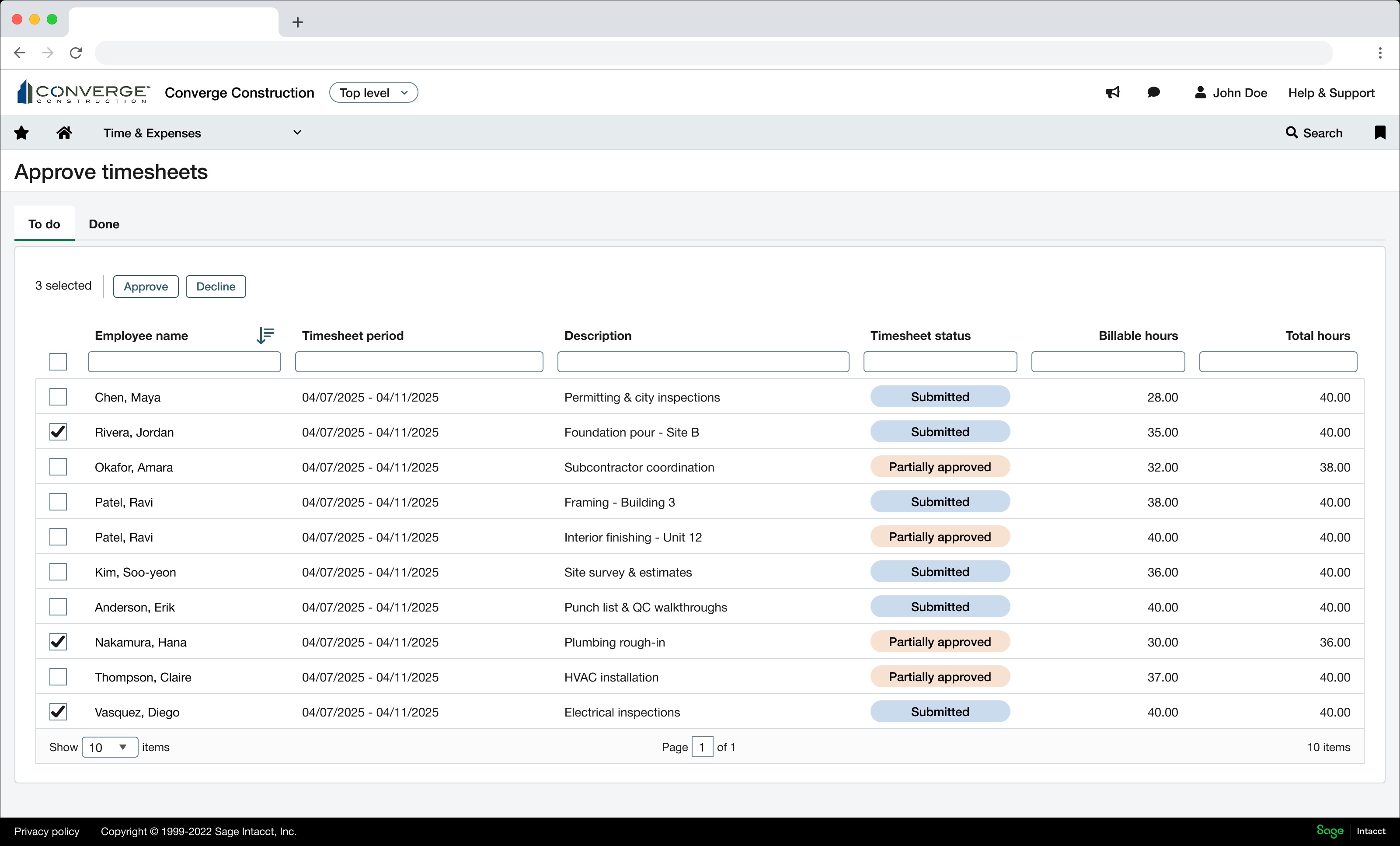
Redesigned timesheet approvals lister, showing employees grouped with submission status and hours.
The redesigned timesheet approvals lister — fast bulk approval with a clear path to deeper review.
The problem

Approvals were slow, fragmented, and didn't fit how managers actually worked.

Managers struggled to efficiently approve timesheets across different teams and projects.
  1. 01 Fragmented workflows across multiple tools
  2. 02 Limited flexibility depending on approval style
  3. 03 Overly complex, text-heavy interfaces
  4. 04 Lack of visibility into what actually required attention
As a result
  • Approvals were slower than necessary
  • Errors were harder to catch
  • The experience didn't adapt to different manager needs
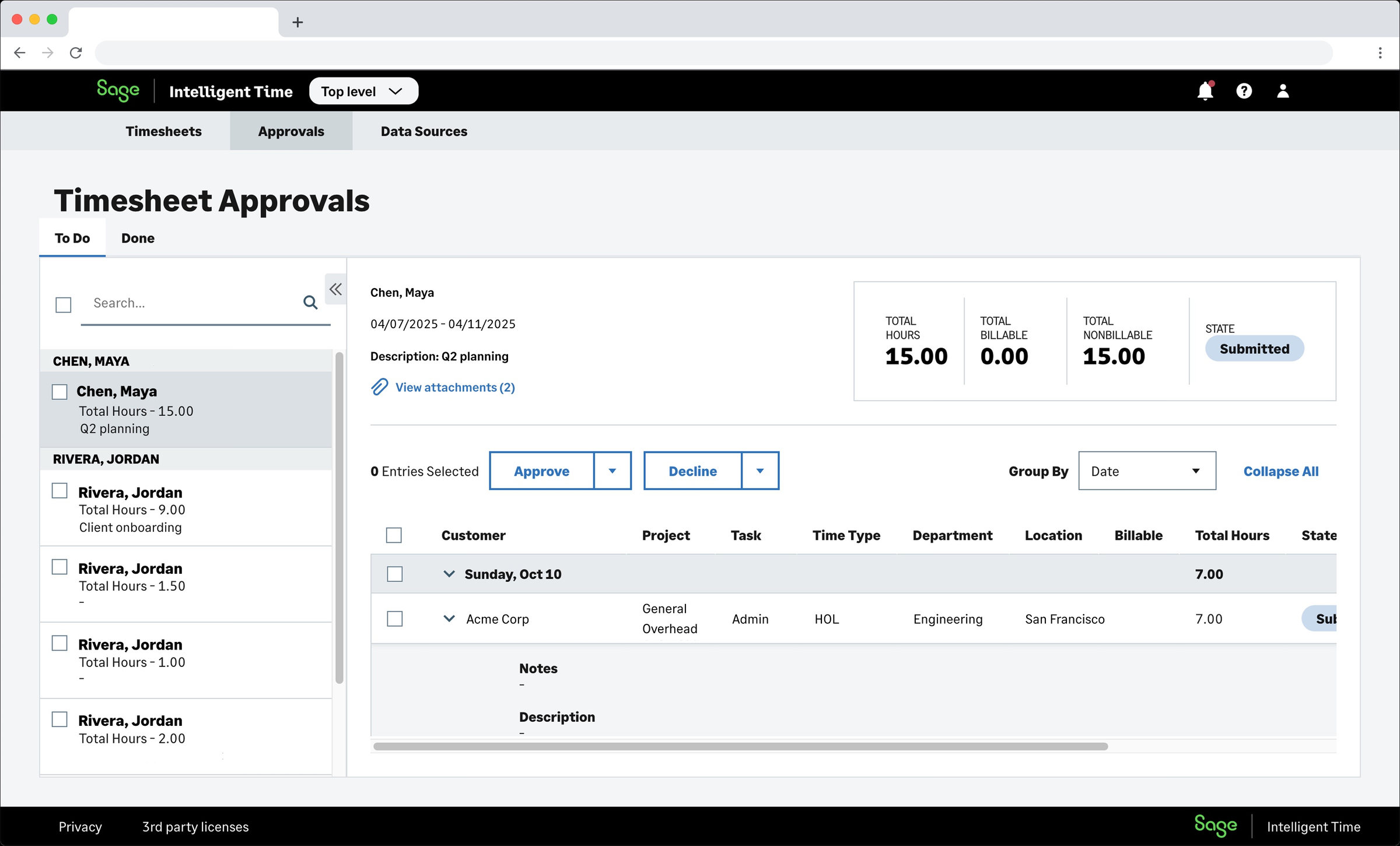
Screenshot of the legacy SIT approvals interface, with a dense two-pane layout and nested data tables.
Before The legacy approvals interface — dense, text-heavy, and disconnected from how managers actually approached the task.
Context

A tool used to track time across people and projects.

Sage Intelligent Time is used by organizations to track employee time across projects. Managers are responsible for reviewing submitted time, approving or rejecting entries, and ensuring accuracy for payroll and project tracking.

Two primary user types emerged in research — people managers, focused on team productivity, and project managers, focused on budgets and compliance.

Shifting the approach

Reframing a UI redesign into a workflow redesign.

Most redesigns start with the design. This one started by questioning whether we were being asked to solve the right problem in the first place.

  1. 01
    Initial direction

    The project was scoped as a redesign of a single approvals page.

  2. 02
    What I noticed

    Through research and early exploration, it became clear that the core issues weren't isolated to one screen — they were rooted in fragmented workflows and inconsistent approval patterns.

  3. 03
    What I did

    I worked with the product manager to reframe the problem from a UI redesign to a workflow redesign.

  4. 04
    Outcome

    We expanded the scope to rethink the entire approval experience, which led to a more flexible system supporting both manager types.

Understanding the problem

Two managers. Two mental models of the same data.

Through research, we found that approvals are high-stakes for employees — directly tied to payroll accuracy, with mistakes creating financial and operational issues. Managers prioritize speed, needing to process many approvals quickly and only investigating when something looks off. And different roles require different levels of detail.

Two distinct user mindsets
Type 01

People Manager

"How much time did each person on my team submit?"

Focus
Team productivity
Approach
Time grouped by employee, with the ability to drill into individual timesheets when something needs a closer look.
Type 02

Project Manager

"How much time was logged against each of my projects?"

Focus
Budget & compliance
Approach
Time grouped by project, looking across multiple employees to track hours and allocations.
Core insight
The two manager types didn't just need different levels of detail — they had fundamentally different views of the same data. People managers think about time per person. Project managers think about time per project. The approval system needed to support both mental models, not force one group into the other's workflow.
Design opportunity

Design a system that adapts to the manager, not the other way around.

  • Enables fast approvals by default
  • Surfaces detail only when needed
  • Adapts to different manager workflows
Solution

Two views of the same data, in one system.

Two directions emerged from the two user types — and rather than choosing one, we designed a system that supported both. Both views lived within the same application, accessible from a shared navigation menu, so managers could easily reach either depending on what they needed.
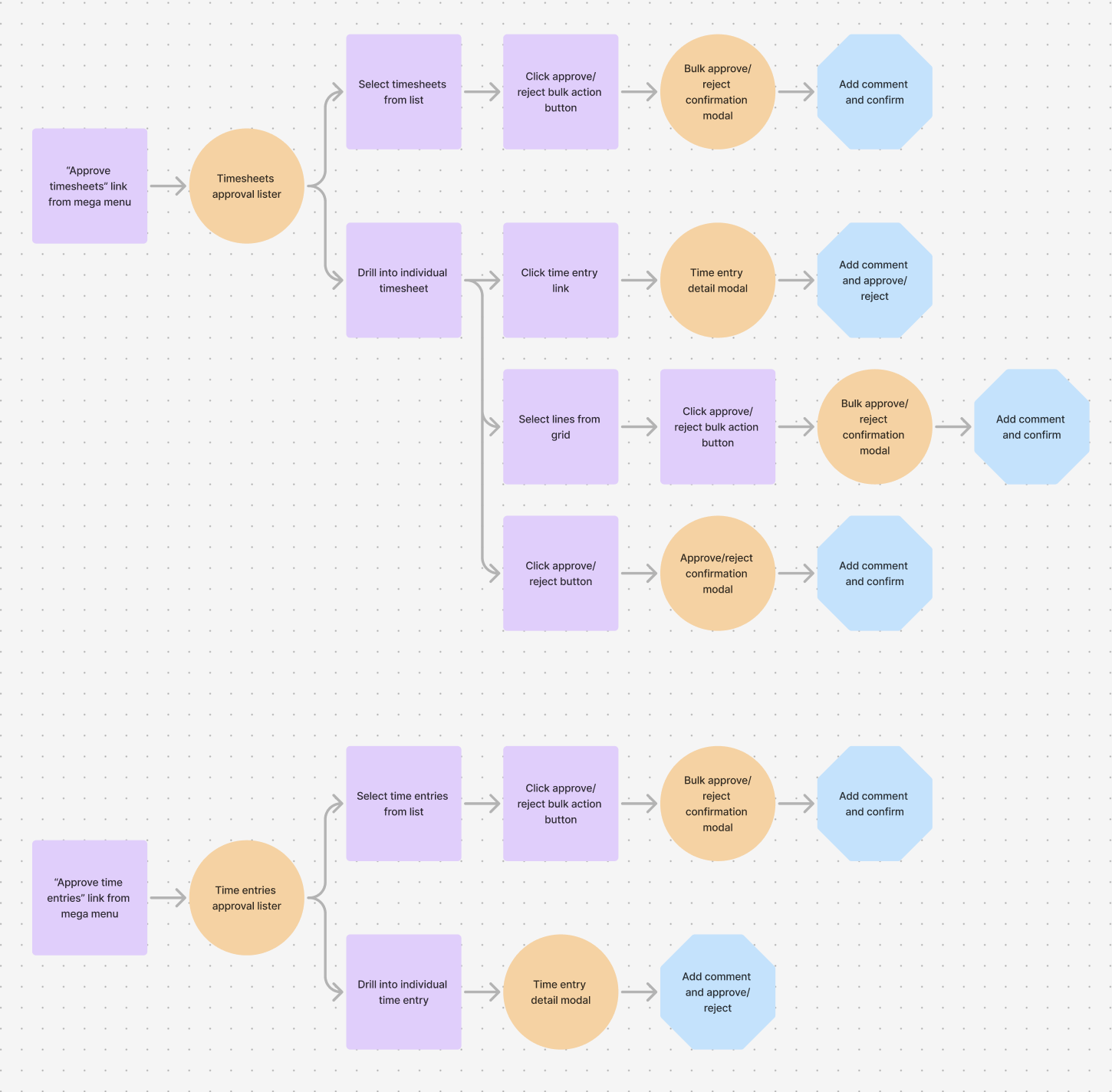
Flowchart showing the two approval pathways — timesheet-based and time-entry-based — each branching from a mega menu link through bulk-select and detail flows to a shared confirmation step.
The full approval system — two parallel pathways branching into bulk and detail flows, converging on a shared confirmation pattern.
01

Employee-grouped approval

For people managers

Time is organized by employee, showing each person's submitted timesheet. Managers can approve at the timesheet level or drill into individual entries when something needs closer inspection.
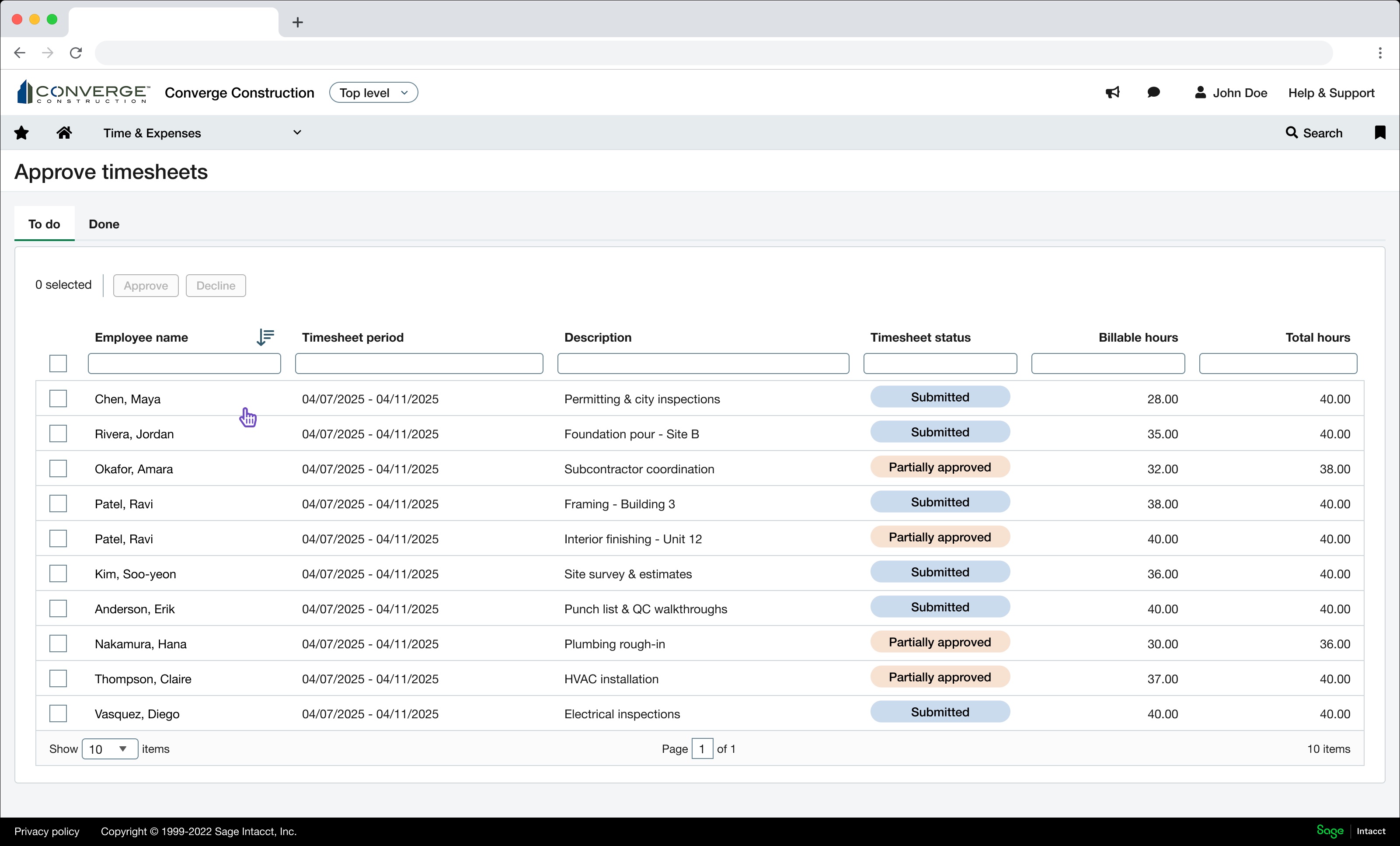
The timesheet lister with multiple rows selected for bulk approval.
01 Bulk-approve at the timesheet level for routine submissions.
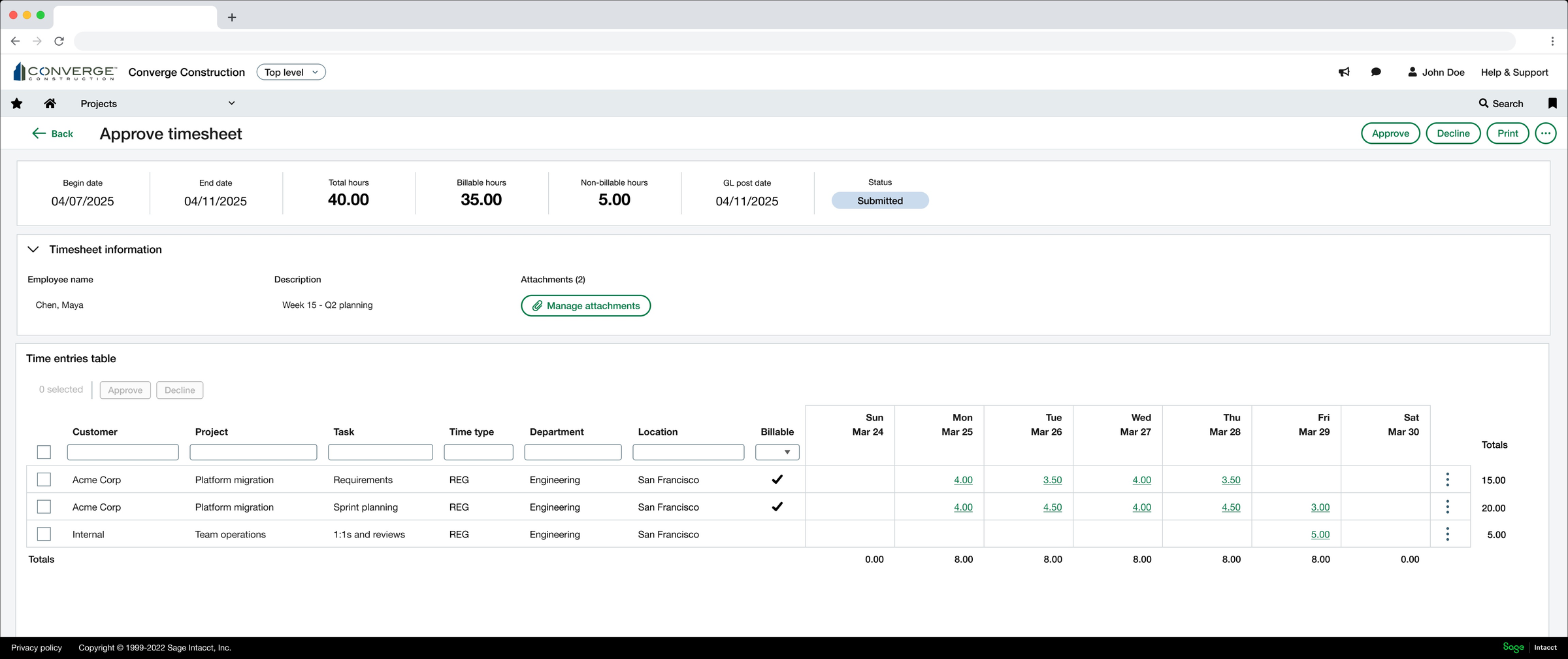
A single timesheet detail view, showing the weekly time grid for one employee.
02 Drill into a single timesheet when something needs closer review.
02

Project-grouped approval

For project managers

Time is organized by project, aggregating hours across employees. Managers can review allocations and flag discrepancies against budgets — moving fluidly from the full list down into a single entry's detail.
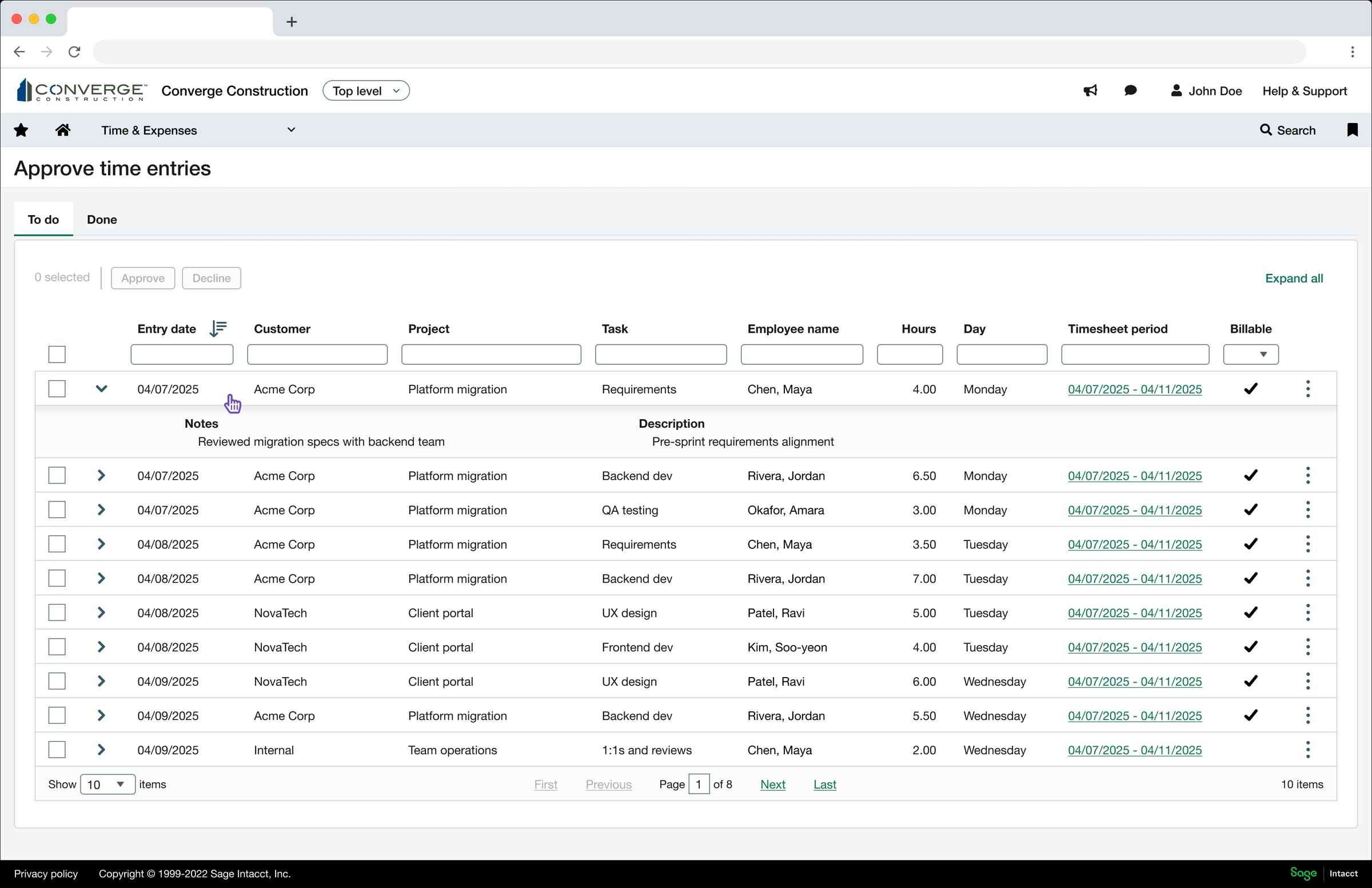
The time entries lister, with rows showing customer, project, task, and employee.
01 Review entries across projects, customers, and tasks in a single list.
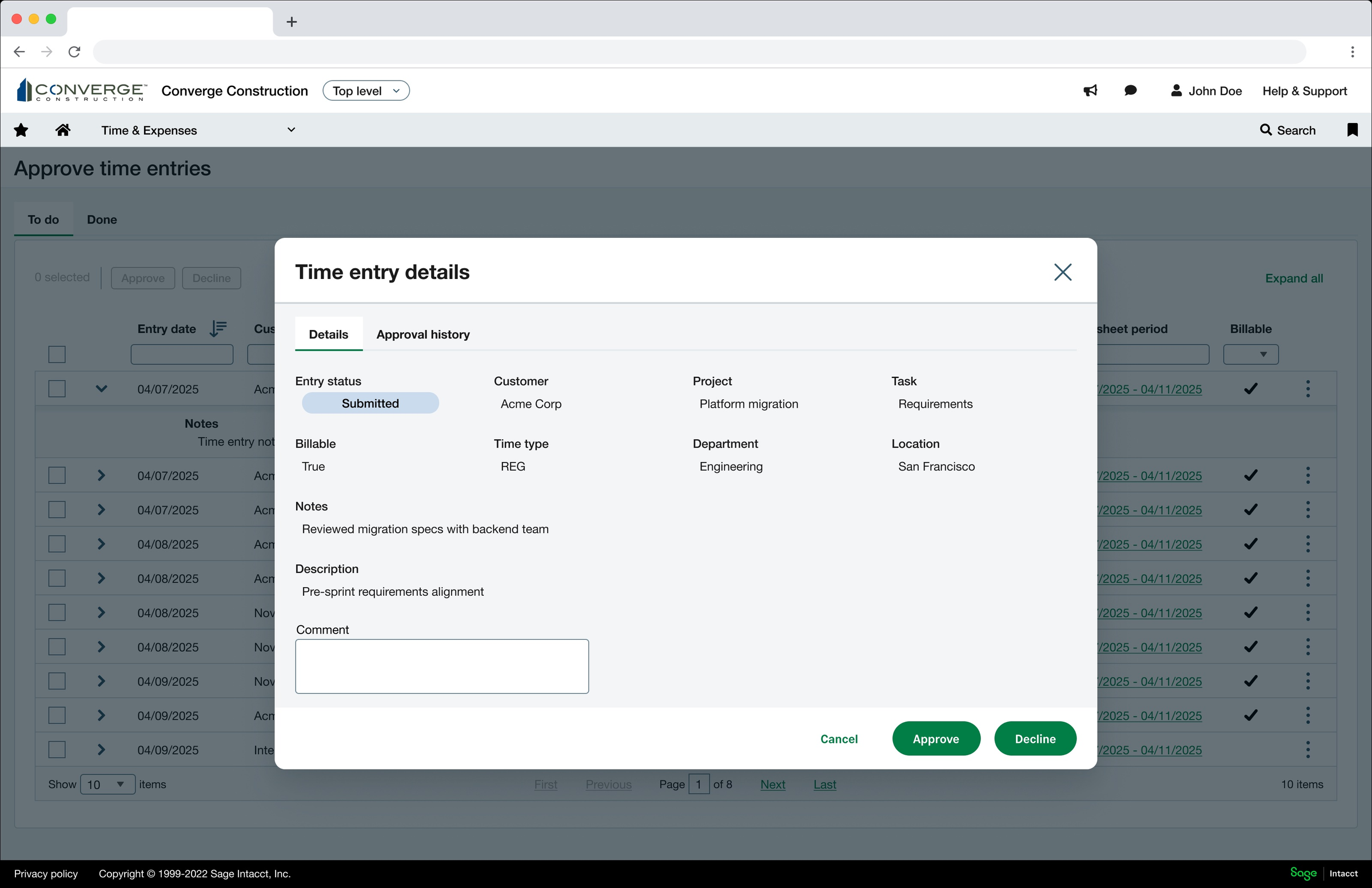
The time entry detail modal, showing entry status, project, task, billable flag, and notes.
02 Inspect any entry's full context without leaving the list.
Outcomes

What we shipped, and what it changed.

  • Shipped a redesigned approvals experience that replaced a single page with two dedicated views tailored to how people managers and project managers actually work.
  • Enabled bulk approval at the timesheet level with drill-in for detailed review, reducing the number of steps required for routine approvals.
  • Unified two previously disconnected approval patterns within a single application, so managers could switch between employee and project views as needed.
  • Established a more flexible foundation for future approval scenarios as Sage Intelligent Time expanded.
Reflection

What I'd do differently, and what stuck with me.

What I would improve
  • Add smarter signals to highlight anomalies automatically.
  • Validate impact with more quantitative metrics.
  • Further personalize the experience based on manager role.
Key learning
Enterprise tools don't need to be complex — thoughtful structure and progressive disclosure can make even dense workflows feel simple and efficient.